The email testing MCP server for coding agents.
Your agent sends the email, waits for it to land, looks at it in Gmail and Outlook, fixes the template and checks again. One hosted server, signed in with OAuth.
- 500 emails a month, no card
- EU-hosted
- OAuth, no API key
Claude Code
-
Add the server in your terminal.
claude mcp add --transport http mailloop https://api.mailloop.io/mcp -
Run
/mcp, pick mailloop and choose Authenticate. -
Sign in to Mailloop in the browser. No API key to copy.
Cursor
-
Create an API key in Settings, Organization, API keys.
-
Add the server to your Cursor config.
~/.cursor/mcp.json{ "mcpServers": { "mailloop": { "url": "https://api.mailloop.io/mcp", "headers": { "Authorization": "Bearer ml_live_xxx" } } } }
ChatGPT
-
In ChatGPT, claude.ai or Claude Desktop, open Settings, Connectors and choose Add custom connector.
-
Paste the server URL.
https://api.mailloop.io/mcp -
Sign in to Mailloop and approve the organization.
The test loop your agent runs
Wait for the real email, then read it
The agent creates a temporary sandbox and signs up with its address, or points the app's SMTP at it. wait_for_email holds until the message lands; get_email returns the subject, the HTML and every link, so the agent can open the verification link itself.
Sign up on staging with a fresh address and open the verification link.
The link opens /verify on staging and the account is confirmed.
See it the way Gmail and Outlook draw it
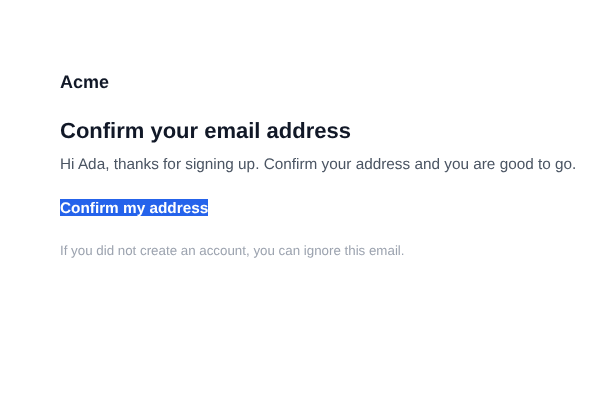
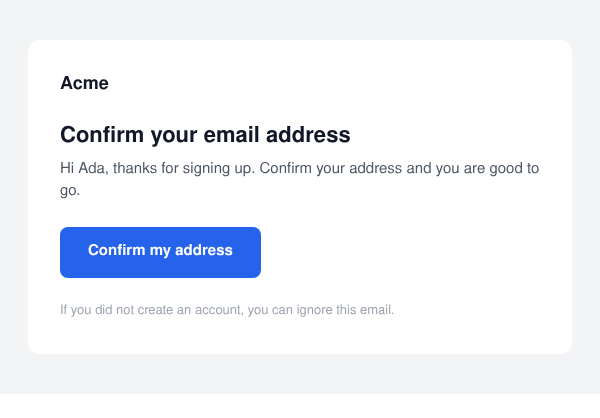
screenshot_email renders the captured email for up to four clients at a time, light or dark, and says what each client changed. The agent looks at the images and the findings, not just the HTML it wrote. Slide across: Outlook classic drops the button padding Gmail keeps.
Fix the template and check again
When a render shows a problem, the agent edits the template, triggers the email again and renders the same client until it passes. The loop you would run by hand across a few inboxes, done in one conversation.
One hosted MCP server, set up in a minute in
- Claude Code
- Cursor
- claude.ai
- ChatGPT
What teams ask their agent to check
Plain requests in the chat. The agent picks the tools.
Signup and verification
"Sign up on staging with a fresh address, wait for the verification email and open its link."
Password reset
"Request a reset for [email protected] and check the link points at staging and the token survives."
A redesigned template
"I changed the receipt layout. Render it in Outlook classic and Gmail on iOS, light and dark."
Localized emails
"Switch the account to German, trigger the welcome email and check the subject and the dates."
A missing email
"List what staging captured in the last hour and tell me why the invite never arrived."
Webhooks
"Add a webhook to my tunnel, fire a test event and show me the delivery log."
Email MCP server, common questions
The MCP docs list every tool. Testing from code instead? The SDK has the same wait call. Comparing tools? See how Mailloop compares.
Is there an MCP server for email testing?
How do I test emails with Claude Code?
Can an AI agent check how an email looks in Outlook and Gmail?
Does the Mailloop MCP server need an API key?
Can the agent email real people by accident?
Which email MCP servers are there?
Last updated